Here is a quick registry tweak or script to rename the Recycle Bin icon caption in Windows 10 and earlier.
Rename the Recycle Bin text (caption) in Windows
There are two methods discussed. The first method uses a custom VBScript, and the second method uses registry editing using the Windows Registry Editor.
Using Windows Script to rename the Recycle Bin
- Copy the following contents to Notepad:
Dim WshShell : Set WshShell = WScript.CreateObject("WScript.Shell") sBasekey = "HKCU\Software\Microsoft\Windows\CurrentVersion\Explorer\CLSID\" strBinName = Inputbox ("Enter a text for the Recycle Bin icon", "Rename Recycle Bin", "Recycle Bin") If trim(strBinName) <> "" then Wshshell.regwrite sBasekey & "{645FF040-5081-101B-9F08-00AA002F954E}\", strBinName, "REG_SZ" WshShell.AppActivate "Program Manager" Wshshell.SendKeys "{F5}" End if - Save the file as
rename_recycle_bin.vbs - Double-click the script file to run it.
- When prompted, type a name for the Recycle Bin icon and click OK.
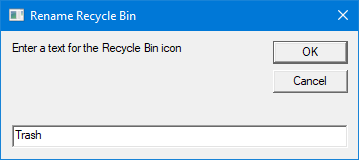
The script renames the Recycle Bin caption and refreshes the desktop by sending the F5 key automatically.

Using Registry Editor to rename the Recycle Bin
- Start Regedit.exe
- Navigate to the following registry branch:
HKEY_CURRENT_USER\Software\Microsoft\Windows\CurrentVersion\Explorer\CLSID\{645FF040-5081-101B-9F08-00AA002F954E} - Double-click (default) and replace the existing text (“Recycle Bin”) with your preferred text.
- Exit the Registry Editor.
- Right-click on the desktop and click Refresh. Or, click on the desktop and then press F5.
The above methods work in all versions of Windows, including Windows 10.
One small request: If you liked this post, please share this?
One "tiny" share from you would seriously help a lot with the growth of this blog. Some great suggestions:- Pin it!
- Share it to your favorite blog + Facebook, Reddit
- Tweet it!

